The Real Reason AHT Drops but Customer Frustration Rises in Call Centers
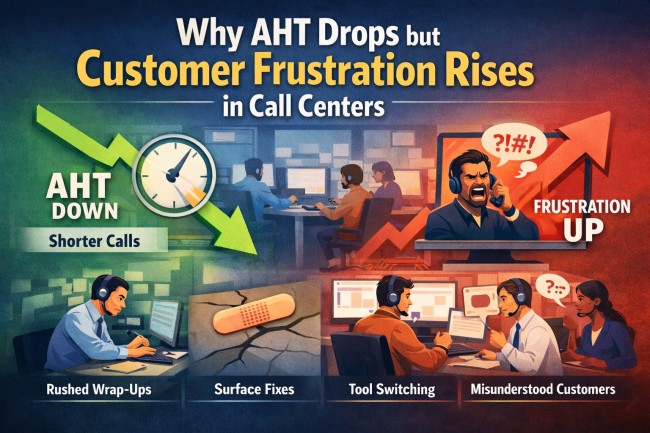
Calls move faster when queues surge, yet the floor doesn’t feel any lighter. Agents speed up and shorten their wrap-ups. AHT drops, yet customers return more frustrated on the next call. You hear it in the tone shifts, the surprise escalations, and the repeat callers who sound more annoyed each time. Something inside the workflow is slipping even as the time metrics look strong.
This article breaks down why AHT can fall while frustration rises and shows how to steady the flow without slowing the team. Contact center quality assurance software helps you act early by showing where speed starts weakening the experience.
Why Falling AHT Can Raise Tension in the Queue
Even when time metrics look clean, the floor can lose its balance. Fast calls hide gaps that surface later as frustration, repeat volume, and tense escalations.
Here are the issues that show up when that happens:
- Rushed Transitions: When wrap-ups get rushed, notes lose the details customers rely on, pushing them to repeat information.
- Surface Fixes: A quick answer can land first, yet the deeper issue keeps brewing and returns stronger later.
- Fragmented Tools: With every extra screen jump, the agent’s focus slips, and the call feels slower even if the timer says otherwise.
- Misread Customer Intent: Ending the call without a final check leaves the customer unsure, turning their next interaction into an irritated repeat.
How to Steady AHT Without Increasing Customer Frustration
Right now, AHT sits at 6 minutes and 10 seconds, and the average talk time lands around 3 minutes and 35 seconds.
Faster calls work only when the structure behind them stays solid. With clearer pacing and fewer hidden gaps, the queue moves with more control.
These tactics strengthen the foundation so speed feels smooth, not brittle:
1. Build Space Into Wrap-Ups for Complete Documentation
Good wrap-up habits shape how cleanly work moves across the queue. Small moments of structure help agents capture what matters without slowing the floor. The goal is a rhythm that feels steady even when volume climbs.
Without a steady wrap-up rhythm, gaps in context spread across shifts, and customers return feeling unheard. Re-contact grows, escalations rise, and queues tighten even when AHT looks healthy.
Set a simple wrap-up pattern agents can follow every time by capturing actions taken, noting any remaining steps, and confirming what the customer expects next. Keep it short so it fits naturally into fast-paced queues. Use the same structure across shifts to reduce variation and keep context intact.
How can a call center quality monitoring tool reinforce steady documentation?
Call center quality monitoring tool highlights wrap-up patterns and shows when documentation time drops to levels that create handoff risks. An agent might rush through every wrap-up during peak hours, which might lead you to reset their flow with a simple note pattern that keeps context intact.
2. Strengthen Root-Cause Checks on Short Calls
Fast calls benefit from a quick pause that confirms the core of the issue. That tiny checkpoint becomes a stabilizer for the rest of the interaction. It adds just enough depth to support stronger outcomes.
When fast calls skip deeper checks, the issue resurfaces with more tension the second time around. Escalations increase, customers get impatient, and the team loses the benefit of lower handle time.
Add a quick clarifying question into the flow to verify what the customer actually needs. Keep the phrasing consistent so agents can use it without slowing down. Let that moment anchor the rest of the call and solidify the resolution.
How can a call quality monitoring app reinforce deeper checks?
Call quality monitoring app highlights unusually short interaction patterns so leaders can review them alongside QA and contact data. An agent might close calls in under a minute without a clarifying question, which could nudge you to reinforce one quick checkpoint that prevents repeat demand.
3. Reduce Tool-Switching During High-Volume Hours
Busy periods call for a setup that stays the same every time. A simple workspace keeps attention on the customer instead of the software. A clear path through the work helps agents keep their pace.
If agents keep bouncing between screens, hesitation creeps into the call, and customers feel the strain. Frustration builds, pacing falls apart, and even quick interactions start sounding rushed or uncertain.
Group essential tasks onto fewer screens and rearrange layouts to reduce jumping between systems. Set quick-access paths for peak periods so agents reach what they need with fewer clicks. Keep the workspace predictable to support smoother pacing.
How can contact center metrics from a monitoring tool expose hidden tool friction?
Contact center metrics from a monitoring tool show how often agents bounce between applications and where those jumps interrupt workflow. An agent might switch screens half a dozen times per interaction, which might prompt you to streamline their workspace so the call moves with more confidence.
4. Calibrate Agent Checks for Customer Understanding
Clear communication at the end of a call sets the tone for what happens next. A quick confirmation helps both sides leave aligned. It also gives agents a reliable way to close conversations with confidence.
When calls end without confirming understanding, confusion returns as repeat volume or escalations. Customers feel brushed aside, and short AHT becomes a misleading signal instead of a sign of strong service.
Introduce a short playback line that restates the resolution in plain language. Encourage agents to pause long enough to hear any hesitation before ending the call. Use the same closing pattern to create consistency across the team.
How can a workforce intelligence platform support clearer customer alignment?
Insightful io workforce intelligence platform shows common patterns in how calls end, and you can check them when customers start calling back more often. An agent might end the call without checking understanding, which could push you to guide them toward a clearer close.
5. Strengthen AHT Stability with Smart Tools
A monitoring software strengthens these tactics by giving you clear visibility into pacing and workflow timing. It shows where speed supports the customer experience and where it quietly breaks down.
Here are the specific signals the tool brings forward:
- Wrap-Up Consistency Insight: Reveal where agents shorten documentation rhythms and create gaps across shifts.
- Verification Step Signals: Surface fast interaction patterns that may benefit from added consistency checks during coaching.
- Workspace Load Patterns: Show where screen-jumps cluster during high-volume periods and introduce drag into calls.
- Closing-Pattern Indicators: Track interactions that end without confirmation cues linked to repeat demand.
Conclusion
Once agents move through clearer workflows, verify deeper needs, and use steadier wrap-up habits, fast calls turn into strong resolutions instead of fragile ones. A monitoring tool gives you the visibility to guide those shifts before frustration takes hold. The result is an inbound operation where speed stays high and the customer experience stays steady.