NoteGPT AI Image Generator: Transforming Ideas into Stunning Visuals
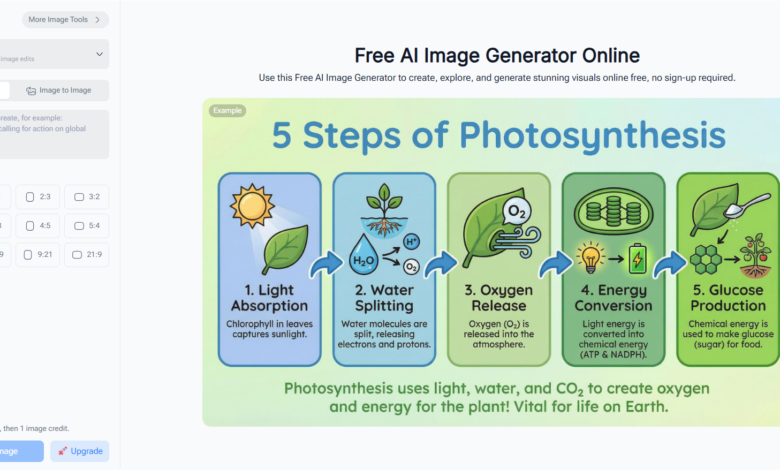
As someone who spends most of my day working with visuals, I’ve tested countless image generation tools. The thing about NoteGPT’s AI Image Generator is that it doesn’t just churn out images—it actually interprets your ideas in ways that feel surprisingly human. When I first heard about it, I was skeptical, but after a few hours of testing, I realized this was different. It’s not just about inputting a prompt and waiting for pixels. This tool gives you a sense that it understands composition, lighting, and style preferences.
Things are like this: I often need multiple versions of an idea quickly, and NoteGPT’s AI Image Generator lets me do exactly that. You can generate images based on text prompts, upload your own reference images, and even select output sizes ranging from 1K to 4K. This flexibility means that whether I’m prepping assets for social media, concept art, or client presentations, I can get high-quality visuals in minutes.
Features That Actually Matter
Flexible Prompt-Based Generation
The core strength of NoteGPT’s AI Image Generator lies in its prompt-based generation. You type in what you want, and it interprets it with nuance. I’ve tried prompts ranging from abstract concepts like “a futuristic city reflecting on water at sunset” to very concrete ones like “a detailed sketch of a Nano Banana Pro in a minimalist workspace.” Each time, the results are remarkably aligned with what I had in mind.
Upload Your Own Images
Sometimes, starting from scratch isn’t enough. NoteGPT lets you upload an image to guide the generation. This feature is invaluable if you’re trying to maintain a consistent style across multiple visuals or if you want to remix an existing concept. I uploaded a rough sketch once, and the AI turned it into a polished 4K image that could easily be used for a client pitch.
Multiple Resolution Outputs
This is where the tool really shines for professionals. You can toggle between 1K, 2K, and 4K outputs depending on your needs. For web use, 1K is more than enough. For high-quality prints or detailed presentations, 4K ensures every detail is sharp. Being able to switch resolutions instantly saves time and eliminates the hassle of post-processing.
Advanced Model Switching
Another feature I appreciate is the advanced model toggle. Different AI models interpret prompts differently, and having the option to switch allows for experimentation. I found this particularly useful when working on concept art, as some models give a more painterly feel while others lean toward realistic rendering. It’s like having a team of visual artists available at your fingertips.
My Workflow With NoteGPT AI Image Generator
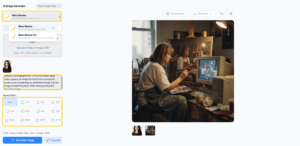
Let me walk you through my typical workflow. First, I start with a clear prompt. I try to describe mood, perspective, lighting, and any objects or characters in the scene. Then, I decide if I need to upload a reference image. If the project is high-stakes, I go straight to 4K. Otherwise, I start with 1K to experiment with ideas quickly.
Once the images are generated, I usually do a quick selection. This is where NoteGPT’s speed is noticeable. I can generate multiple variations of the same prompt in seconds, which means I don’t waste time on trial and error. Finally, I download the images in my preferred resolution and integrate them directly into projects. The entire process feels seamless and efficient.
Real-World Applications
You might wonder, “Who actually benefits from this?” Here’s the thing: whether you’re a content creator, a marketer, a designer, or someone like me who experiments with visual ideas for fun, NoteGPT’s AI Image Generator has practical uses. I’ve used it to create concept art for presentations, mockups for web design, social media posts, and even personalized graphics for client proposals.
One memorable example: I was illustrating a product concept for Nano Banana Pro (https://notegpt.io/nano-banana-pro) , and I wanted something futuristic yet approachable. The AI generated several high-quality visuals that captured exactly what I imagined. It saved hours of manual work and gave me multiple options to choose from.
Why I Recommend It
Honestly, if you’re looking for a tool that balances ease of use, versatility, and quality, NoteGPT’s AI Image Generator is a strong contender. It’s fast, produces high-resolution results, and offers enough control to let your creative intent shine. You don’t feel like you’re fighting the tool; you feel like it’s helping you think visually.
The best part is that it doesn’t just cater to professionals. Even hobbyists or students experimenting with digital art can benefit from it. You get to see your ideas take shape quickly, and that’s incredibly satisfying.
Conclusion
Using NoteGPT AI Image Generator has been a game-changer in how I approach visual content. It’s intuitive, powerful, and surprisingly human in the way it interprets prompts. If you’ve been looking for a reliable, versatile AI Image Generator that works for both professional and personal projects, this is definitely worth exploring.