From Concept to Playable: How AI Is Reshaping the Game Art Iteration Cycle
There is a moment in every game development project where the art pipeline becomes the bottleneck. You have a working prototype, the mechanics feel right, but the game still looks like a collection of colored boxes. The traditional solution is to either commission an artist and wait weeks for assets, or to spend months learning to draw yourself. Both options kill momentum.
This is the friction point that led me to spend the last week exploring how an AI Sprite Generator handles the full iteration cycle—from a rough concept to a playable character in a game engine. What I found was not just a tool for generating art, but a system that fundamentally changes how quickly you can iterate on game design.
The core problem with traditional sprite creation is not just the time it takes to draw each frame; it is the cost of making changes. Want to tweak a character’s color scheme? That means redrawing every frame. Want to add a new animation? That is another 20 hours of work. This rigidity forces developers to commit to art decisions early in the process, often before they have fully tested their gameplay. The AI generator takes a different approach: it treats art as a flexible, iterable asset rather than a fixed, final output.
The Iteration Problem in Traditional Game Development
To understand why this matters, you have to look at how most indie games are actually made. The typical workflow is linear: prototype with placeholder art, commission final art, integrate it into the engine, and then test. If the art does not work with the gameplay—if the walk cycle feels too slow or the attack animation lacks impact—you are stuck. Changing anything means going back to the artist, paying for more work, and waiting for revisions. This linear process discourages experimentation. Developers settle for “good enough” because the cost of iteration is simply too high.
How the AI Workflow Enables Rapid Iteration
The AI generator flips this model by making art generation fast and cheap enough to be part of the iteration cycle itself. You do not have to commit to a final design before testing it in your game. You can generate a character, test it in your engine, tweak the description, generate a new version, and test again—all in the same afternoon.
Step 1: Define the Character Concept
From Text to Visual in Minutes
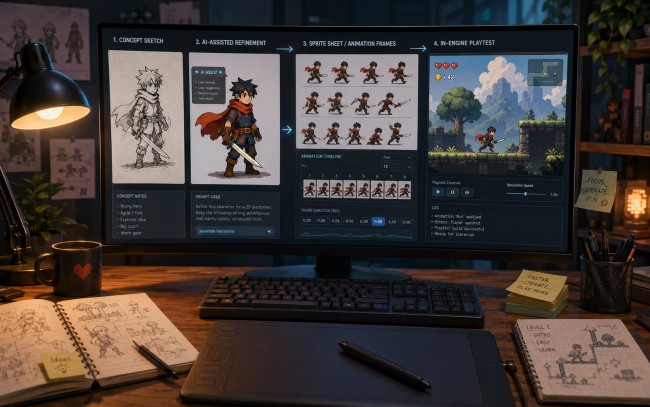
The process starts with a character description. You can upload a character image or simply describe your character’s appearance in text. You then choose an art style preset—pixel art, 2D cartoon, or anime—or train the AI on your own reference images. This is where the iteration loop begins. If the initial result does not match your vision, you can refine your description or adjust your reference images and generate again. The cost of a failed generation is measured in seconds, not hours or dollars.
Step 2: Generate the Animation
Testing Motion Without Commitment
With the character defined, you select the animation type and set the frame count and speed. The AI generates all animation frames with perfect style consistency in under 60 seconds. This speed is critical for iteration. You can generate a walk cycle, drop it into your game engine, and see how it feels in the context of your gameplay. If the walk is too slow, you adjust the frame rate and regenerate. If the attack animation lacks impact, you tweak the description and try again. This is not possible with traditional workflows, where each animation is a significant investment.
Step 3: Export and Test in Engine
Closing the Feedback Loop
The export process is designed to minimize friction between generation and testing. One-click export to Unity, Godot, or Unreal includes a sprite sheet atlas, JSON metadata, animation controller presets, and collision box suggestions. For Unity, you get a sprite atlas with.meta files and animation controllers. For Godot, it exports directly to AnimatedSprite format with.tres resource files.
For Unreal, it provides Paper2D-compatible sprite sheets with flipbook data. This means you can go from a text description to a playable character in your game engine in under ten minutes. The feedback loop is tight enough that you can iterate on character design in real-time, testing different looks and animations alongside your gameplay mechanics.
A Comparison of Iteration Workflows
To illustrate the difference, here is a side-by-side comparison of how iteration works in each workflow:
| Aspect | Traditional Workflow | AI Sprite Generator Workflow |
| Cost of a Design Change | High (redraw all frames) | Low (regenerate in minutes) |
| Time to Test a New Animation | Days to weeks | Minutes |
| Ability to Experiment | Limited by budget and time | Unlimited within subscription |
| Feedback Loop | Linear and slow | Circular and fast |
| Risk of Committing Early | High | Low |
| Suitability for Prototyping | Poor (too expensive) | Excellent |
This is not just a theoretical advantage. During my testing, I was able to generate and test three different walk cycle speeds for a platformer character in under an hour. In a traditional workflow, that would have meant commissioning three separate animations or spending days redrawing frames. The ability to experiment freely changed how I approached character design. Instead of trying to get everything right on the first try, I could generate multiple versions, test them in the game, and pick the one that felt best.
The Creative Freedom of Low-Cost Iteration
The most significant benefit of this workflow is not just speed; it is the creative freedom that comes from low-cost iteration. When every generation costs nothing but time, you are free to experiment with ideas that you would otherwise dismiss as too risky. Want to see what your character looks like with a different color palette? Generate a variant in three minutes. Want to test how an 8-directional sprite system works for your isometric RPG? Generate all eight angles from a single character base automatically. This kind of experimentation is simply not feasible with traditional workflows.
Generating Variations Without Penalty
The ability to generate character variations is a core feature that directly supports iteration. Once you lock the base style, you can change only colors, equipment, outfit style, or hair and regenerate in two to three minutes. Traditional redrawing of every animation frame per variation would take 20+ hours. This feature is invaluable for testing different visual directions.
You can generate a character in a dark, gritty style, test it in your game, and then generate a brighter, more cartoonish version to see which one better fits the tone of your project. The cost of A/B testing your art direction is reduced to almost nothing.
The Real Limitations in an Iterative Workflow
It is important to be honest about where this workflow falls short. The quality of the output is still dependent on the quality of your input. If your text descriptions are vague or your reference images are inconsistent, the results will reflect that. In my testing, complex or highly specific character designs sometimes required multiple generation attempts to get right. The style consistency is impressive, but it is not perfect; it works best when you invest time in the initial style training step.
Additionally, the AI-generated results have a certain “AI-generated” polish that works perfectly for many indie games, but may not satisfy the aesthetic demands of a project with a very specific, hand-drawn look. The tool itself acknowledges this, suggesting a hybrid workflow where you use the AI for rapid prototyping and base animations, and then import the sprites into Aseprite for final polish if needed. Many developers are already using this approach, using the AI for 90% of their sprites and reserving manual work for hero characters.
Who Benefits Most from This Iterative Approach
This AI Sprite Generator is particularly well-suited for developers who value iteration and experimentation. It is for the solo developer who wants to test multiple art directions before committing to a final style. It is for the game jam participant who needs to go from concept to playable in a weekend. It is for the small studio that wants to prototype mechanics with production-ready art before investing in a full art pipeline. The tool does not eliminate the need for artistic vision, but it removes the friction that prevents developers from exploring that vision. The iteration cycle is no longer the bottleneck; it is the engine of creativity.